Best Gaming Desks for Your Setup

What defines a gaming desk
A gaming desk is more than just a surface for your equipment. It's the foundation for long sessions and a professional setup aesthetic. It combines ergonomic height adjustability, high stability, and a well-thought-out design.
A specialized gaming desk differs from a normal office desk. It's designed for the demands of gamers. This includes intensive use, heavy hardware, and ergonomics that impress even after hours. These features determine its performance and longevity.

Ergonomics for endurance sessions
Long gaming nights take a toll on the body. An ergonomic desk is a necessity to prevent posture damage and tension. Electric height adjustability is crucial here.
It allows you to switch between sitting and standing. This change promotes blood circulation and relieves pressure on the spine. The correct desk height is important, with your arms resting at a 90-degree angle on the surface. This is the basis for a healthy posture.
Stability and load capacity for your equipment
A full gaming setup has a lot of weight. Multiple monitors, a PC tower, or streaming equipment require a stable base. A wobbly desk disturbs concentration and endangers expensive hardware.
Look for a robust frame made of solid steel. The construction determines how well the desk handles vibrations or hectic mouse movements. A high load capacity of over 120 kg gives you the assurance that your setup stands firm.
Materials and design
The quality of the materials determines the longevity of your desk. High-quality desk tops are scratch-resistant and durable. Frames made of powder-coated steel protect against corrosion and withstand impacts.
A well-thought-out design combines functionality with aesthetics. It improves the overall gaming experience through smart details.
The desk should fit perfectly into your setup and offer enough space for all devices.
Smart features
Modern gaming desks offer more than just a holding function. Small details make all the difference:
- Integrated cable management: Ensures a clean look without cable clutter.
- Anti-collision protection: Automatically stops height adjustment if an obstacle is detected, protecting your equipment.
- Quiet motors: Allow for quiet height adjustment without disturbing your game or recording.
These features turn a good gaming desk into a great one. Demand for such desks is growing. The global gaming desk market was estimated at 2.5 billion US dollars in 2024. It is expected to grow to 4.8 billion US dollars by 2033. You can read more about these market developments in gaming desks if you are interested.
The different gaming desks in direct comparison
Gaming desks come in different shapes and with different technologies. Which one is right for you depends on your space, your setup, and your ergonomic preferences. We'll take a closer look at the most common types so you can make the best decision.

Classic rectangular or a corner desk?
The classic, rectangular shape is versatile and fits into almost any room. It offers a clearly defined surface and is suitable for setups with one or two monitors. Its straight lines make it easy to combine with other furniture.
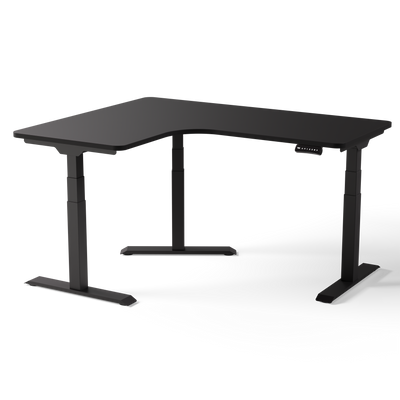
L-shaped corner desks efficiently use space, especially in unused corners. They create more surface area and allow for clear separation. For example, you can separate the gaming area from a work or creative corner. This is useful for streamers to separate the game setup from the production equipment.
An L-shaped desk transforms your space into a command center. You can arrange multiple monitors and devices in an ergonomic arc. This way, everything is within reach.
A rectangular desk is ideal for a tidy, minimalist space. If you need maximum space for a complex multi-monitor setup or want to make good use of a corner, a corner desk is the better choice.
Rigid models or height-adjustable?
Rigid desks have a fixed height. They are often cheaper but offer no ergonomic flexibility. Those who play for hours in the same position risk tension, fatigue, and pain.
Electrically height-adjustable gaming desks are the superior solution. You can switch between sitting and standing at the touch of a button. This change in posture promotes blood circulation, relieves pressure on the spine, and can improve your concentration. For any gamer with regular, long sessions, this is an investment in performance and health.
A look at the technology: The drive systems
In electrically height-adjustable desks, the motor is the heart of the system. The number of motors determines the power, stability, and longevity of your desk.
-
Single-motor systems: A single motor drives both desk legs via a drive shaft. This is a more cost-effective option with lower load capacity and slower adjustment speed. This can be sufficient for light setups.
-
Dual-motor systems: Each desk leg has its own motor. This ensures more even weight distribution, higher load capacity, and faster, quieter height adjustment. Dual-motor desks are the standard for gaming setups.
-
Triple-motor systems: These systems are used for large, L-shaped corner desks. Each of the three legs has its own motor. This guarantees the highest stability and load capacity. It is essential for heavy setups with multiple monitors or a sim racing rig.
The choice of drive is crucial for the performance of your setup. If you want to dive deeper into the technical details, you will find all the information in our comprehensive height-adjustable desk comparison.
An overview of DESKSPACE models
To make your choice easier, we have created an overview of our DESKSPACE models. This way, you can see at a glance which desk suits your requirements.
Comparison of DESKSPACE Gaming Desk Models
This table shows the technical differences and the suitability of DESKSPACE models for various gaming requirements.
| Model | Drive | Load Capacity | Height Range | Ideal for |
|---|---|---|---|---|
| DESKSPACE PRO | Dual-Motor | 120 kg | 62–127 cm | All-round gamers with standard setups (1–2 monitors) who value ergonomics and a clean design. |
| DESKSPACE PRO PLUS | Dual-Motor (stronger) | 160 kg | 62–127 cm | Power users and content creators with multiple monitors and additional equipment who need more stability. |
| DESKSPACE CORNER | Triple-Motor | 200 kg | 62–127 cm | Streamers and gamers who need maximum space for separate gaming and work areas on one desk. |
| DESKSPACE TITAN | Dual-Motor (heavy duty) | 200 kg | 72–120 cm | Sim racers and users with extremely heavy setups who require uncompromising stability and highest load capacity. |
The choice of model strongly depends on your personal setup. The PRO is a good all-rounder. The TITAN is specially built for demanding applications.
Materials and design as the foundation for stability
The stability and longevity of your gaming desk depend on the quality of the materials and the design. Both determine how well your desk withstands the stresses of intense gaming sessions. A conscious choice of materials is the foundation for any gaming setup.
Each material has specific properties that affect performance. From the scratch resistance of the desk top to the robustness of the frame, all components must be coordinated to guarantee maximum stability.

Important materials for the desk top
The desk top is your central work and play surface and has to withstand a lot. The choice of material influences not only the appearance but also the resistance and the effort required for care.
- Melamine-coated panels: They are robust, scratch-resistant, and easy to clean. Spilled drinks or abrasion from mouse and keyboard can hardly harm them. This makes them the ideal choice for intensive continuous use.
- MDF panels (medium-density fiberboards): These panels offer a smooth and even surface that is well suited for various coatings. They are dimensionally stable and a solid basis for most gaming setups.
- Solid wood: Real wood panels have a unique and natural look. They are durable but require more care to maintain their beauty. Find out more about the properties if you are considering a solid wood desk top.
The surface finish also plays a role. Matte surfaces reduce annoying light reflections from monitors or lamps. This protects the eyes during long sessions and helps with concentration.
The frame as the backbone of your setup
The desk frame carries the entire load of your equipment. It is the most important component for the stability of your desk. A wobbly desk is not only annoying but also poses a risk to your hardware.
A stable frame made of high-quality steel prevents vibrations and wobbling, even with fast mouse movements or the use of force-feedback steering wheels. The construction is crucial for a quiet and concentrated gaming experience.
Powder-coated steel is the industry standard for high-quality desk frames. The coating forms a resistant protective layer. It effectively protects the frame from scratches, impacts, and corrosion. This ensures a long service life, even under heavy use.
The thickness of the steel profiles is a direct indicator of robustness. Stronger profiles lead to higher torsional rigidity and contribute to overall stability. For height-adjustable gaming desks, solid steel profiles are essential to minimize wobbling at maximum desk height.
Design that combines function and aesthetics
Good design seamlessly integrates the desk into your gaming setup. It's not just about aesthetics, but also about functional details that enhance user comfort. A well-thought-out design and matching colors create a workplace that is powerful and aesthetically pleasing.
The willingness to invest in high-quality components is evident throughout the market. The German gaming peripheral industry recorded sales growth of 22 percent in the first half of 2021. The PC peripheral segment, which includes gaming desks, grew strongly. Gamers attach great importance to quality and functionality.
Finding the right desk for your application scenario
Every gamer has individual demands for the perfect setup. The best gaming desk is not off-the-shelf. It must suit you and your way of playing. The choice depends on whether you stream, play competitively, do sim racing, or need to save space.
To help you decide, we have analyzed the most common gamer profiles. We'll show you what matters in your case.

For streamers and content creators
As a streamer or content creator, your desk is your production studio. Everything must fit here: multiple monitors, microphone, camera, ring light, and perhaps a mixer or stream deck. A cluttered workspace is not an option.
An L-shaped corner desk is often the best solution here. It allows for a clear separation of areas. On one side your gaming setup, on the other the production equipment. This creates order and optimizes your workflows.
Stability is important for creators. A wobble-free surface is crucial so that your camera recordings remain steady and the microphone doesn't pick up vibrations from the desk. A solid frame is therefore a must.
Our recommendation for this scenario is the DESKSPACE CORNER. Its triple-motor drive supports a load capacity of 200 kg and ensures the necessary stability in the setup. The large L-shaped tabletop gives you the creative freedom for professional content.
For Sim Racers
Sim racing places the highest demands on the stability of a desk. A force-feedback steering wheel, pedals, and a shifter generate strong forces. A regular desk would wobble uncontrollably under this load.
Here you need a model that is built for extreme loads. A heavy-duty frame made of thick-walled steel is the basis. The desk top must be robust enough to withstand the mounting of accessories without yielding.
What matters for sim racers:
- Maximum load capacity: The frame must withstand the weight of your rig plus your force input.
- Torsional rigidity: The frame must not twist even during strong steering maneuvers.
- Vibration damping: A solid construction minimizes vibrations and guarantees a precise driving experience.
The DESKSPACE TITAN was developed for these requirements. Its reinforced steel construction and a load capacity of 200 kg make it the perfect platform for any demanding sim racing rig. It remains motionless even in intense racing sessions and provides the stability you need for new best times.
For competitive multiplayer gamers
In e-sports, milliseconds decide. A wobbly monitor or an unstable desk top disturbs your concentration. Your focus must be 100% on the game.
For you, a quiet surface and a solid frame are the most important things. Your desk must withstand fast, jerky mouse movements without vibrating. A moderate desk size is often sufficient, as the focus is on the main monitor and a large mouse surface.
A dual-motor drive offers the ideal mix of stability, speed in height adjustment, and quiet operation. It ensures a smooth and safe lift. Our recommendation here is the DESKSPACE PRO PLUS. With its load capacity of 160 kg and reinforced frame, it offers more stability than standard models and guarantees a wobble-free base.
For gamers with limited space
Not everyone has a large gaming room. In a smaller apartment or a shared room, you have to use the available space cleverly. A compact but functional desk is key here.
The size of the desk top is the decisive factor. Models with a width of 120 cm or 140 cm are often ideal. They offer enough space for a monitor, keyboard, and mouse. You should not do without height adjustment here either. It allows you to perfectly adjust the desk to your height and chair.
For gamers with little space, we recommend the DESKSPACE PRO. It is available in various compact sizes. It combines a slim design with the full ergonomics of an electrically height-adjustable gaming desk. Its dual-motor drive and load capacity of 120 kg are sufficient for a single-monitor setup and offer comfort in a small space.
Accessories: How to optimize your gaming setup
A first-class gaming desk is the foundation. Only the right accessories turn it into a functional and clean command center. Without these helpers, even the best desk falls short of its potential.
Matching accessories solve specific problems. They organize cables, create space on the desk top, and improve ergonomics. You can fully concentrate on your game without being distracted by clutter.
Cable management for a clean look
A tidy setup starts under the desk. A wild tangle of cables destroys the aesthetics of a professional gaming area. It not only looks messy but also collects dust and makes cleaning difficult.
Effective solutions are a must here. They bring structure to chaos and ensure that all connections are securely and invisibly stowed away.
- Horizontal cable trays: They are screwed directly under the desk top. They are the collection point for power supplies, power strips, and excess cable lengths.
- Vertical cable snakes: Indispensable for height-adjustable desks. A flexible cable snake bundles all cables leading to the floor and adapts to any desk height.
- Cable ties and clips: For the final touch. With reusable Velcro cable ties or self-adhesive clips, you can neatly route individual cable strands along the desk frame. This ensures a flawless look.
Monitor mounts for more space and better posture
Monitor stands are space eaters. A monitor mount is one of the most effective upgrades for your setup. It lifts the screen off the desk top, giving you more space for your keyboard and mouse.
The most important advantage is better ergonomics. With a monitor arm, you can precisely adjust the height, depth, and tilt of your screen to your sitting position. The top edge of the screen should be at or just below your eye level. This alignment relieves the neck and shoulders and prevents tension during long gaming sessions. You can find instructions in our guide on the correct adjustment of a monitor mount on the desk.
A monitor mount is not an aesthetic accessory. It is a tool for healthy posture and maximum utilization of your workspace.
PC mounts and drawers: Order for your setup
There are other helpers that optimize your gaming area by keeping things tidy and protecting your hardware.
PC mounts: Your gaming PC does not belong on the floor. There it attracts dust, which reduces cooling performance and shortens the life of the components. A PC mount that is installed under the desk top is the elegant solution. The computer floats above the floor, is safe from dust, and the air circulates better. With a height-adjustable desk, the PC moves up with it, so the cables never become too short.
Drawers: Controllers, charging cables, and adapters need a place. Drawers that can be mounted under the desk top are ideal for storing such items within reach and invisibly. They create additional storage space without filling the desk top and help create a minimalist look.
Proper care for a long desk life
A high-quality gaming desk is a long-term investment. To ensure it still looks good and functions perfectly after a long time, it requires minimal care. Regular, gentle maintenance keeps all components in good condition.
This is uncomplicated. With a few simple steps, you can effectively protect your desk from wear and tear. This way, it remains the reliable centerpiece of your setup.
How to clean the desk top correctly
The desk top is used the most. The choice of the right cleaning agent is crucial to avoid damaging the surface. Aggressive or abrasive agents are unsuitable.
For daily cleaning, a soft, slightly damp cloth is sufficient. For stubborn stains, a mild soap solution helps.
Here is a quick guide for the most common surfaces:
- Melamine-coated panels: These surfaces are very robust. A damp microfiber cloth, if necessary with a mild neutral cleaner, is ideal. Always dry the panel well afterwards to avoid water stains.
- Solid wood panels: Wood is a natural material and requires more care. Wipe up spills immediately. For cleaning, only use a damp cloth and wipe in the direction of the wood grain.
Do not use harsh cleaners, solvents, or abrasive cleaners. These attack the surface seal and can cause irreparable damage.
Care for frame and electronics
The frame and technical components also require regular care. Otherwise, dust and dirt can accumulate and interfere with the mechanics.
The powder-coated steel frame is very easy to care for. Wipe it occasionally with a dry or slightly damp cloth. Make sure that no moisture gets into the motors or the control unit.
For the technology, you should consider these points:
- Motors and lifting columns: Keep the moving parts of the lifting columns dust-free. A dry cloth is sufficient. Do not use lubricating or penetrating oils. These can damage the internal mechanism.
- Cables and connections: Occasionally check that all cables are still securely seated and have no kinks. Clean cable management prevents you from pulling out a plug when adjusting the height.
With these simple care steps, you ensure that your best gaming desk will continue to function reliably for many years to come. Your investment in quality deserves this attention.
Frequently asked questions about gaming desks
When choosing the perfect gaming desk, the same questions often arise. Here we have collected the answers to the most common ones so that you can make an informed decision for your setup.
What size is ideal for a gaming desk?
That depends on your equipment. For a single-monitor setup, a desk top of 140x70 cm is usually sufficient. This will fit everything important, such as a large mouse pad, keyboard, and peripherals.
If you plan to use two monitors, you should go for at least 160 cm wide. For three monitors or extensive streaming equipment, 180 cm or 200 cm are the better choice to have enough space.
A desk top with a depth of 80 cm is very useful. It gives you more distance to the monitor, which is better for your eyes. You also have more space to comfortably rest your arms. This prevents tension.
Which is more stable: T-leg or C-leg frames?
With T-leg frames, the desk legs are centered under the top. This construction distributes the weight evenly. The result is high stability, especially against sideways wobbling. You also have maximum legroom.
C-leg frames have the legs further back. This often looks modern but can have a disadvantage with some models. If you lean heavily on the front edge of the desk, it can lose stability.
For gaming, where stability is crucial, solid steel T-leg frames are usually the better choice.
How much load capacity does my gaming setup need?
For a standard gaming setup with two to three monitors, PC, and speakers, a load capacity of 120 kg is safe. This gives you enough buffer without the motors running at their limit.
If your equipment is heavier, for example, due to a sim racing rig, several large monitors, or professional audio equipment, you should choose a frame with 160 kg or more. This ensures that the desk stands stably even under dynamic loads and that the motors have a long service life.
Ready to upgrade your setup? Discover Deskspace's selection of TÜV-certified, height-adjustable gaming desks and find the right model for your needs.
Configure your gaming desk now at deskspace.de