


Corner computer desks: Making the most of your workspace

A corner computer desk transforms unused room corners into a productive workspace. It offers an extended work surface and helps clearly separate different task areas. This makes it an efficient solution, especially for multi-monitor setups and combining digital and analog work.
Why corner desks are a good room solution
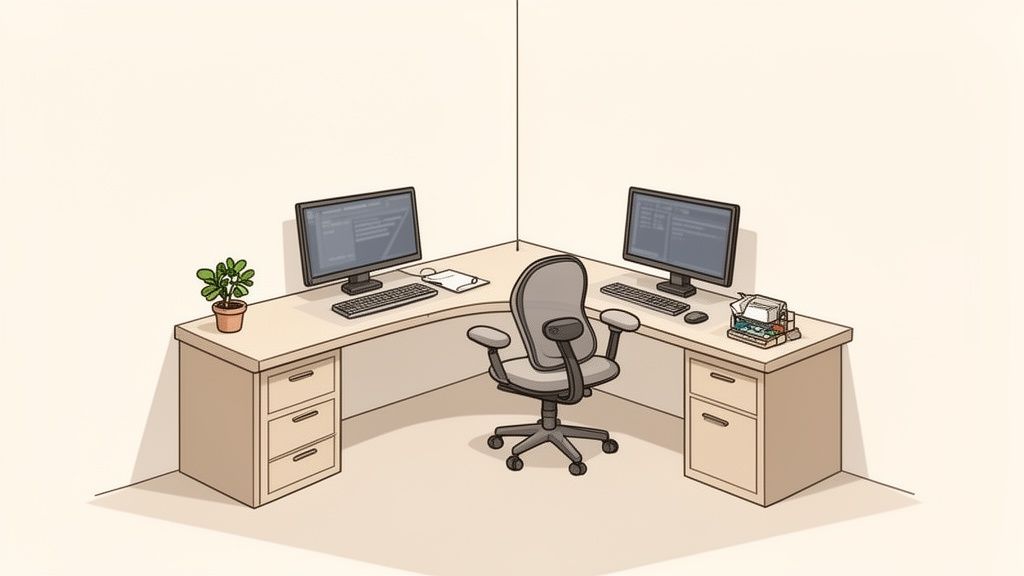
Unused corners are wasted space. Corner computer desks make optimal use of a room's footprint. Instead of a dead corner, you get a continuous work surface that blends into the room. This is an advantage in small home office environments or open-plan offices.
Maximum space utilization and clear structure
The L-shape of a corner desk creates two separate zones. You can use this division for different tasks. One side, for example, is reserved for computer work. The other provides space for documents, sketches, or technical equipment.
This clear structure helps maintain focus and keep the workspace organized. According to a Fraunhofer Institute study, time is lost searching in unstructured offices. A tidy workspace, as promoted by a corner desk, increases productivity.
Advantages of the structured surface:
- Clear separation: You can use one area for your main tasks and the other for secondary activities or filing.
- Less distraction: Everything has its fixed place. This leads to less clutter and thus less visual distraction.
- Everything within reach: The most important work tools are always accessible without having to get up.
Ideal for ergonomic multi-monitor setups
For many, two or more monitors are part of everyday work today. With a straight desk, this often means constantly turning your head sideways. Neck and shoulder tension can be the result. A corner computer desk solves this problem.
You can place your monitors in the corner angle of the desk. This creates a natural panoramic field of view that allows you to maintain an ergonomically correct, central sitting position. Your head and neck remain in a relaxed posture because you can view the screens with minimal movements.
A corner desk supports a healthy posture. It allows for a natural, semi-circular arrangement of monitors. This reduces strain on the cervical spine and makes concentrated work over longer periods more comfortable.
Practical examples for home office and office
In the home office, a corner desk transforms an unused corner into a full-fledged office. It creates a clear demarcation from the living area and offers enough space for projects. The result is a professional and space-saving work environment.
In professional office environments, corner desks are used to structure open spaces. They can help form small work groups or create quieter individual workstations. They also give employees space for complex tasks. The generous surface facilitates the integration of ergonomic accessories such as monitor arms.
What matters when choosing your corner desk
Good preparation helps avoid a bad purchase. Your new desk should fit perfectly into your room.
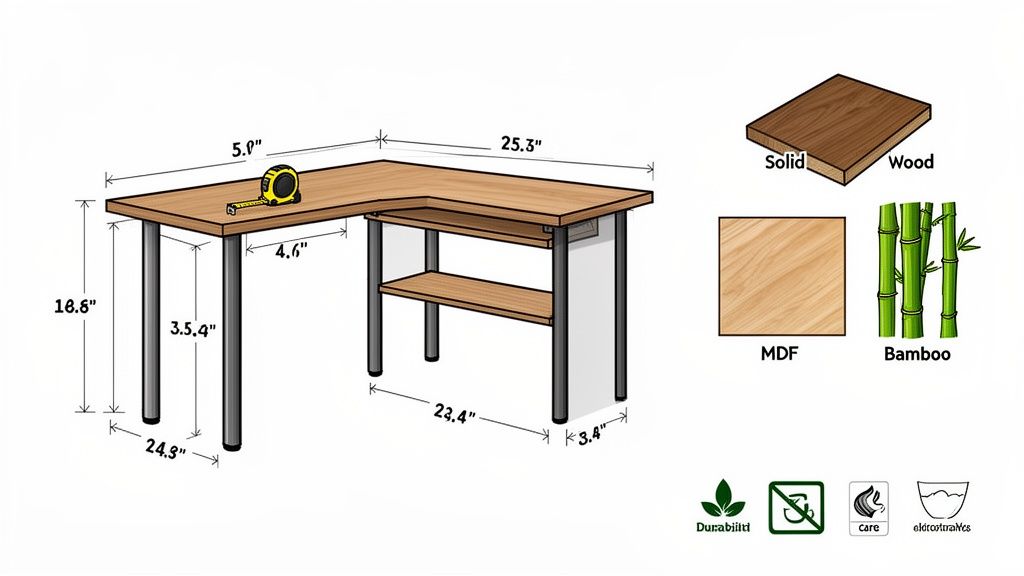
The first step is measuring. Take a tape measure and accurately determine how much space is available in the corner. Don't just think about the desk, but also the range of motion for your office chair.
Finding the right dimensions: leg length and depth
The leg dimensions indicate how long the two sides of the L-shaped desk are. These numbers are crucial. They determine whether the desk fits in the room and how much workspace you have.
Compact setups often work with dimensions like 160x120 cm. Those who need to accommodate multiple monitors and equipment should choose 180x160 cm or larger. Consider beforehand what you plan to put on your desk.
An often neglected feature is the desktop depth. If it's too shallow, you sit too close to the monitor. This is uncomfortable and bad for your eyes.
- Minimum dimension: Plan for at least 70 cm here, 80 cm is better.
- Healthy distance: This creates the necessary ergonomic viewing distance of 50 to 80 cm from the screen.
- Free space: You'll have enough space for your keyboard, mouse, and a wrist rest.
Material question: What should go on the top?
The material of the desk top is more than a matter of taste. It influences the durability and maintenance effort of your desk.
Solid wood is robust, durable, and brings a warm atmosphere into the room. Each top is unique. Solid wood requires care and reacts to humidity fluctuations.
MDF panels are a pragmatic alternative. They are often coated with a resistant finish that makes them easy to maintain. The surface is smooth and even.
Bamboo is a sustainable option. The material is hard and resistant, yet relatively light. It provides a modern, bright look.
The choice of material is a compromise between optics, budget, and practicality. For intensive everyday work, a coated MDF panel is often an uncomplicated all-rounder.
Ergonomics: Height and stability
Ergonomics is the most important point. If you spend many hours a day at your desk, it is a necessity. Incorrect desk height is a major cause of neck and back tension.
The best solution for this is a height-adjustable frame. This allows you to adjust the desk height to your body size and dynamically switch between sitting and standing. This stimulates circulation and relieves your spine.
Equally crucial is stability. A wobbly desk that sways with every keystroke is unusable. Therefore, pay attention to these points:
- Material: A frame made of solid steel offers a secure stand.
- Construction: Wide feet and clean workmanship are important. The table must not wobble even in the highest position.
- Load capacity: Check the maximum load capacity. If you want to set up several monitors and a heavy PC, you should choose a dynamic load capacity of at least 120 kg.
A stable and ergonomically adjustable corner desk is an investment in your health and productivity. It creates the basis for a workspace where you can stay focused.
Comparison of important corner desk features
This table helps you compare the most important features and find the right model for your requirements.
| Feature | What to look for | Why it's important |
|---|---|---|
| Leg dimensions | Adjust to the available space in the corner. Also consider freedom of movement. | A table that is too large won't fit; one that is too small won't provide enough workspace. |
| Desktop depth | At least 70 cm, 80 cm is better. | Ensures a healthy viewing distance to the monitor and sufficient space for keyboard and arms. |
| Height adjustability | Electric models offer convenience for switching between sitting and standing. | Promotes dynamic work, prevents back pain, and increases concentration. |
| Top material | Choice between solid wood (aesthetics), MDF (easy care), or bamboo (sustainability). | Influences durability, maintenance effort, and the appearance of your workspace. |
| Stability & load capacity | Steel frame, wide feet, and high load capacity (at least 120 kg for multi-monitor setups). | Prevents wobbling, protects your equipment, and provides a secure working feeling. |
| Cable management | Integrated cable trays, grommets, or nets. | Keeps the workspace tidy, prevents cable clutter, and reduces tripping hazards. |
With these points, you are equipped to make an informed decision. A well-chosen corner desk will become the core of your productive workspace.
Height-adjustable corner desks for maximum ergonomics
Sitting rigidly at a desk all day forces your body into an unhealthy posture. A height-adjustable corner desk is the solution to counteract this problem. It makes the dynamic switch between sitting and standing easy. This movement is important for your back health.
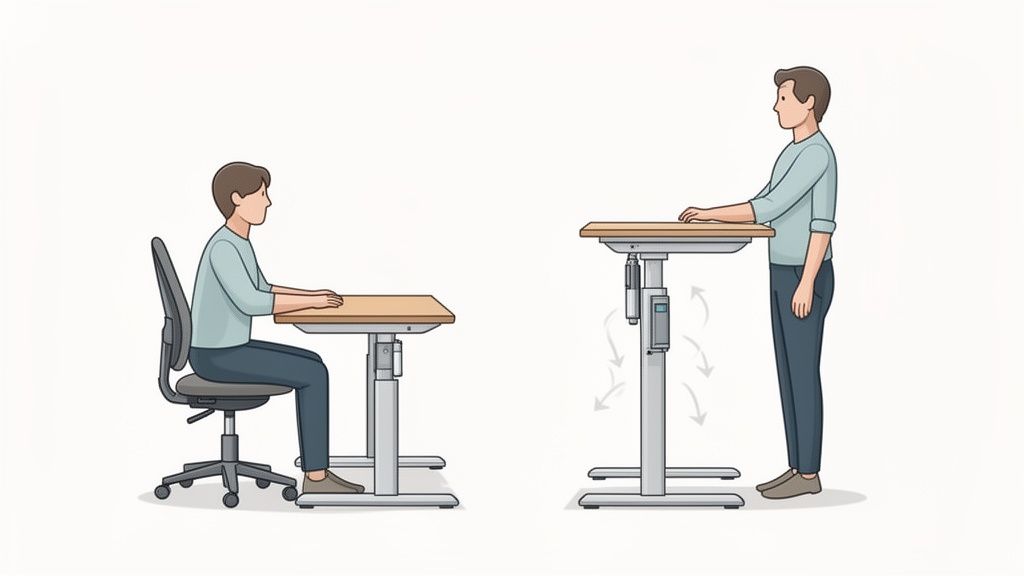
Modern models with electric height adjustment make changing posture easy. A push of a button is enough and the work surface glides to your ideal standing or sitting height. This comfort is crucial so that you use the function regularly and actively prevent tension.
The technology behind the movement: 2- vs. 3-motor systems
For L-shaped desks, systems with two or three motors are used. The number of motors determines the performance and stability of the desk. One motor per desk leg ensures that the top moves evenly and synchronously.
A 3-motor system is standard for high-quality corner desks. The load is distributed more evenly, which makes the desk more stable. You will notice this particularly when the desk is fully loaded and you move it to the highest position.
The most important differences:
- Stability: A three-motor system guarantees wobble-free movement, even with heavy weight.
- Lifting speed: Three motors move the tabletop faster and more smoothly than two. The change takes only a few seconds.
- Noise level: Since the individual motors are less heavily loaded, modern 3-motor systems often operate more quietly.
- Load capacity: Models with three motors have a higher load capacity. This is important for an extensive setup with heavy equipment.
Ergonomics is crucial to avoid office complaints. A survey shows that 72% of users complain about back pain caused by incorrect sitting. Powerful, height-adjustable models are therefore increasingly in demand. You can find more about office furniture trends on statista.com.
Load capacity and smart features
The dynamic load capacity is a crucial value. It indicates how much weight the table can safely lift during movement. If you work with multiple monitors and a heavy PC, you should plan for a load capacity of at least 150 kg. A high load capacity is also a quality feature for the robustness of the frame.
A corner computer desk with a high load capacity gives you the security to use all your equipment without compromise. It is the stable base for a professional workstation.
Smart features make everyday life comfortable. A memory function saves your preferred sitting and standing heights. A quick tap is enough and the table moves to the stored position.
An integrated collision protection is another safety feature. Sensors detect obstacles and stop the movement immediately. This prevents damage to furniture and technology.
Use cases for different user types
A height-adjustable corner desk adapts to various working styles. Power users and developers with multi-monitor setups get the necessary surface and stability. Switching to standing can promote concentration during long coding sessions.
Creatives and content creators who switch between digital and manual work also benefit. The desk height can be adjusted to the respective activity. Standing promotes a more active posture, which can support creative processes. Read more about how to optimally use your height-adjustable L-shaped desk.
Optimally organizing your workspace at a corner desk
A high-quality desk is a good foundation. The right organization turns it into a productivity hub. Your corner computer desk offers plenty of space. Structuring this space cleverly is the key to more focus.
Position the desk so that light falls from the side. This avoids glare on the monitors. This trick protects your eyes and prevents fatigue.
Cable management as the foundation of order
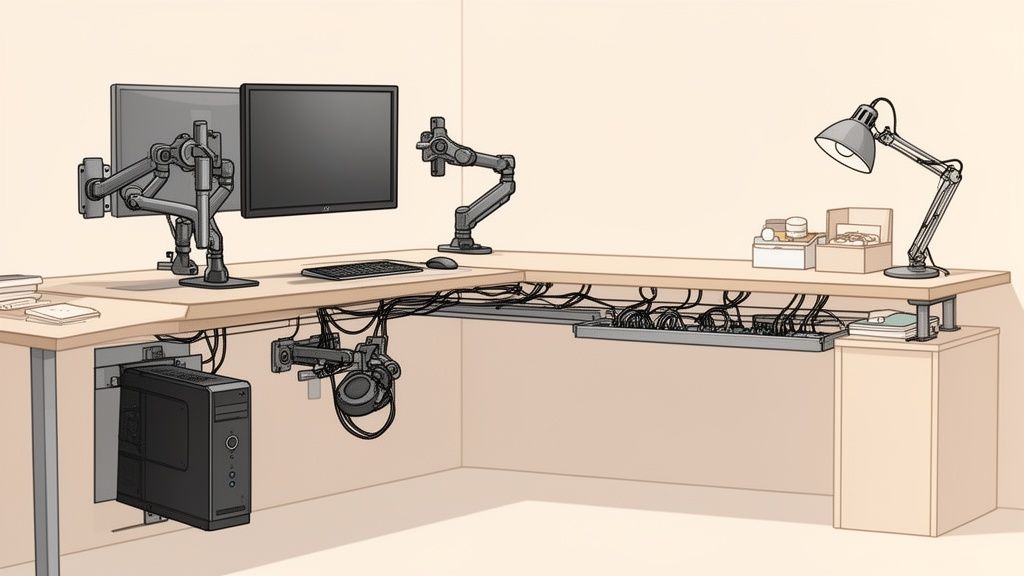
Cable clutter disrupts the appearance and functionality of a workplace. It's a dust collector, a tripping hazard, and complicates any reorganization. Well-thought-out cable management is a necessity, especially for height-adjustable desks.
A neatly organized workspace looks more professional and promotes concentration. The Fraunhofer Institute has found that in unstructured offices, up to 30% of working time is lost to searching. A tidy area reduces visual distractions.
Important aids for a clean setup:
- Cable trays: They are screwed under the desk top and hold power supplies, power strips, and cables.
- Cable sleeves: These flexible sleeves bundle cables that run from the desk to the floor.
- Cable clips and Velcro ties: Use clips to guide individual cables along the desk edge. Velcro ties bundle cable strands flexibly.
Intelligent cable management is the invisible backbone of an organized workspace. It creates safety, facilitates cleaning, and provides a calm, professional look.
Useful accessories for ergonomics and functionality
With suitable accessories, you can get more out of your corner desk. These are often small investments that make a big difference to your working comfort and health.
A monitor arm is an effective ergonomic tool. It allows you to adjust your screens in height, depth, and tilt and bring them precisely to your viewing height. The top edge of the monitor should be at or just below your eye level. This relieves strain on your neck and shoulders.
A PC holder is another clever idea. The computer is attached directly under the desk top. This creates space on the floor, protects the PC from dust, and makes vacuuming easier. With a height-adjustable desk, the holder ensures that cables do not get tangled.
Other useful helpers:
- Document holder: Positions documents at eye level next to the monitor.
- Drawer unit: Creates additional storage space for office supplies.
- High-quality desk lamp: Provides targeted, glare-free light.
By strategically organizing your workspace, you transform your corner computer desk into a command center tailored to your needs. In our guide to desk organization, you'll find more tips.
The right model for different user types
Everyone has different demands on their workplace. A corner computer desk is a multi-talent. Only the right configuration makes it your perfect tool. Your daily tasks, your equipment, and your preferences determine which features are important.
Choosing the right model requires a look at your own needs. Whether you work in a home office, implement creative projects, or furnish an office influences your requirements for stability, space, and functionality.
For intensive home office power users
Anyone who works in a home office every day needs more than just a surface. The desk becomes a partner for long working days. For this type of user, two things are important: secure stability and a generous work surface.
A corner computer desk provides the ideal base. The L-shape allows you to divide your workspace into primary and secondary areas. The main side holds the monitor and keyboard. The side wing is reserved for documents or a laptop.
Important features for power users:
- Maximum stability: A solid steel frame is crucial. The desk must not wobble.
- Large, undivided surface: A continuous tabletop without disturbing legs gives you freedom in design.
- Top ergonomics: An electrically height-adjustable model is recommended. It enables dynamic work and prevents back pain.
- Clever cable management: Integrated cable trays are indispensable for order and safety.
For power users, the corner desk is the cockpit of their productivity. It must be stable and adapt to long, concentrated work phases.
For Gamers and Creators
Gamers and creatives place high demands on their hardware and their desk. Heavy multi-monitor setups, large PC cases, and streaming equipment require a stable base with high load capacity.
A corner computer desk offers the solution to accommodate everything. The large surface allows monitors to be arranged in an ergonomic arc. This provides an immersive experience. At the same time, there is enough space for a large mouse pad or drawing tablets.
What matters for this setup:
- High load capacity: A dynamic load capacity of 150 kg or more is a must for heavy equipment. Look for a frame with three motors.
- Plenty of space for monitors: The leg dimensions should be generous so you can set up multiple monitors.
- Deep desktop: A depth of at least 80 cm is important. This way you maintain a healthy viewing distance and have space for your equipment.
- Robust surface: The tabletop should be scratch-resistant and easy to maintain.
For SMEs and office furnishing
When it comes to office furnishing, durability, low maintenance, and uniform standards are paramount. A corner computer desk can also be a solution here to utilize space and provide employees with generous workstations.
For businesses, services are crucial. A long warranty, reliable customer service, and the security of being able to reorder suitable models are important criteria. Models such as the Corner height-adjustable corner desk offer a professional solution.
Aspects for office furnishing:
- Durability and low maintenance: The desks must be designed for daily, intensive use.
- Safety certificates: Test seals such as TÜV or IGR create trust in quality and safety.
- Service and warranty: A long warranty period of up to 10 years and reliable support are important for companies.
- Uniform aesthetics: Desks in different sizes but with the same design ensure a coherent overall picture.
Frequently asked questions about corner computer desks
A corner desk is a big purchase. Questions are normal. Here we answer the most frequently asked questions we receive from customers.
What are the ideal dimensions for a corner computer desk?
The perfect size depends on your space and your working habits. There is no universal recipe, but guidelines you can orient yourself by.
For a compact home office, leg dimensions like 160 x 120 cm are often sufficient. You can place a monitor and important documents on it without overcrowding the room.
Are you planning a multi-monitor setup or regularly need space for documents? Then think bigger. Models with 180 x 160 cm or 200 x 160 cm give you the necessary space.
Many underestimate the desktop depth. Plan for at least 70 to 80 cm here. That's ergonomics. Only then do you get the necessary viewing distance to the monitor.
Before ordering, take a tape measure. Don't just measure the footprint, but also think about the space for your office chair.
Is a height-adjustable corner desk really necessary?
If you spend more than just occasional time at your desk, the answer is yes. A height-adjustable model is an investment in your health and concentration.
The ability to regularly switch between sitting and standing makes a big difference. This has been proven multiple times:
- Back relief: The one-sided strain on the spine is avoided. This protects against typical office pains.
- Circulation stimulation: Movement pumps oxygen into the brain. You stay more alert and fitter.
- Maintaining focus: Many report being more creative and concentrated when standing. Fatigue dips become less frequent.
For anyone who wants to be productive in a home office or office, a dynamic workstation is an important change. A rigid desk forces you into passivity. A height-adjustable desk enables active and healthy work.
What's the best way to assemble a corner desk?
Assembly is not rocket science. The right preparation and a helper are important. Due to the size and weight of the panels, you should tackle the project with two people.
This method ensures successful assembly:
- Spread out parts: Lay out all parts on the floor and check for completeness using the instructions.
- Flip panels: Place the desk panels face down on the floor. Use a blanket to prevent scratches.
- Assemble frame: Build the complete frame directly on the flipped panels. This is easier than lifting the heavy frame onto the panels later.
- Loosely tighten screws: First, only hand-tighten all screws. This allows for perfect alignment.
- Fine-tune and tighten: Once everything is correctly positioned, tighten all screws firmly.
- Flip desk: Carefully flip the desk with two people and place it in position. Use a spirit level to check if it's straight.
This "upside-down assembly" is a safe method to neatly put together a large desk.
What should I pay attention to regarding load capacity and stability?
These are important quality features. If you want to use a lot of technology, you need a foundation that doesn't wobble. An unstable table is a risk for your equipment.
Pay attention to these values:
- Dynamic load capacity: This number indicates how much weight the motors can move. A value of 120 kg is a solid base. For power users with a lot of technology, 150 kg or more is recommended.
- Frame material: A frame made of solid steel with wide feet ensures stability.
- Number of motors: For an L-shaped table, a 3-motor system is optimal. Each leg has its own motor, which distributes the weight. The result is smooth movement and high stability.
A stable stand is the basis for a professional work feeling. You want to concentrate on your work, not on a wobbly table.
Ready to improve your workspace? Check out Deskspace's ergonomic and stable corner desks and find the perfect solution. You benefit from TÜV-tested quality, up to 10 years warranty, and can test everything for 100 days.


